
Images have become one of the fastest ways to find information, compare products, learn new concepts, and explore content online. Every day, millions of people search for images to identify objects, verify photos, discover shopping products, or simply find visual inspiration. As artificial intelligence continues to improve, image search has evolved from a basic search feature into a powerful technology that understands the actual content of an image instead of relying only on keywords.
Modern image search techniques make it possible to search using text, photos, screenshots, or even a live camera. Advanced technologies such as computer vision, machine learning, and AI-powered visual recognition can identify objects, read text from images, detect landmarks, recognize similar visuals, and locate the original source of a picture within seconds. This has made image search an essential tool for students, researchers, marketers, designers, online shoppers, journalists, and businesses alike.
In this definitive guide, you’ll learn how image search works behind the scenes, explore the most effective image search techniques, compare the best image search engines and AI-powered tools, and discover practical strategies for finding more accurate results. Whether you’re a beginner looking to understand the basics or a professional seeking advanced search methods, this guide will help you use modern image search technology with greater confidence and efficiency.
In This Guide, You’ll Learn
- What image search is and how it has evolved from traditional keyword searches to AI-powered visual search.
- Different image search methods, including keyword search, reverse image search, visual similarity search, object recognition, OCR, and multimodal search.
- The best image search tools for finding similar images, identifying products, verifying image sources, and detecting duplicates.
- Practical applications of image search across education, eCommerce, journalism, digital marketing, research, and content creation.
- Expert tips and best practices to improve search accuracy, choose the right tools, and avoid common image search mistakes.
What Is Image Search?
Image search is the process of finding images on the internet using either text queries or visual inputs such as photos and screenshots. Unlike traditional web search, which focuses mainly on matching keywords, image search analyzes visual content to deliver relevant results. Modern search engines use technologies like artificial intelligence (AI), computer vision, and machine learning to identify objects, colors, patterns, faces, and text within images, making searches more accurate and context-aware.
Today, image search is widely used for discovering similar images, identifying products, verifying image authenticity, finding the source of a photo, and exploring visual content across the web. Whether you’re researching a topic, shopping online, creating content, or checking image copyrights, image search helps you locate the most relevant visuals quickly and efficiently.
Traditional vs Modern Image Search
Traditional image search relied heavily on metadata such as filenames, alt text, captions, surrounding page content, and manually assigned keywords. Search engines could only understand what an image represented based on the text associated with it. While this approach worked reasonably well, it often produced inaccurate or incomplete results when image descriptions were missing or poorly optimized.
Modern image search goes far beyond keywords by analyzing the actual visual content of an image. AI-powered computer vision can recognize objects, people, landmarks, colors, text, and relationships between different elements within an image. This allows users to upload a picture instead of typing a query and receive highly relevant matches, visually similar images, or detailed information about the objects shown in the image.
Why Search Engines Use Image Recognition
Search engines use image recognition to better understand visual content and improve search accuracy. By analyzing what appears inside an image rather than relying only on text, AI can identify objects, faces, logos, products, landmarks, and written text with remarkable precision. This technology powers features such as reverse image search, visual shopping, OCR, duplicate image detection, and AI-powered visual discovery, delivering faster and more relevant search results for users.
How Image Search Actually Works
Modern image search is powered by artificial intelligence, computer vision, and machine learning to understand and retrieve relevant images from billions of files across the web. Instead of relying only on keywords, search engines analyze an image’s visual characteristics, contextual information, and semantic meaning before comparing it with indexed images. This multi-step process allows users to search with text, upload an image, or even use a smartphone camera to find accurate and visually similar results.
Crawling Images
The first stage of image search is crawling. Search engines use automated bots, commonly known as web crawlers or spiders, to scan websites and discover image files. While crawling, they collect valuable information such as image URLs, filenames, alt text, captions, surrounding page content, and metadata. This information helps search engines understand the context of each image before adding it to their database.
Image Indexing
After images are discovered, they are processed and stored in a searchable index. During image indexing, search engines organize information such as image size, format, quality, descriptive text, metadata, and page relevance. Creating an organized index enables the system to retrieve matching images quickly whenever users perform a search, resulting in faster response times and more accurate search results.
Computer Vision
Computer vision allows search engines to understand what actually appears inside an image. Instead of reading only the associated text, AI analyzes visual elements such as objects, people, animals, landmarks, colors, shapes, textures, and even written text. This technology enables image search systems to recognize visual content with remarkable accuracy, making modern search far more intelligent than traditional keyword-based methods.
Feature Extraction
Once an image has been analyzed, the system extracts its most important visual features. These include edges, colors, textures, shapes, patterns, and object boundaries that make the image unique. Rather than storing every individual pixel, feature extraction creates a compact digital representation that allows search engines to compare millions of images efficiently while maintaining high search accuracy.
Deep Learning & Embeddings
Modern image search systems rely on deep learning models trained on millions of labeled images. These neural networks learn to recognize objects, faces, products, scenes, and visual relationships automatically. As they process more data, they become increasingly accurate at understanding image content, even when images have been cropped, resized, edited, or captured from different angles.
The extracted visual information is then converted into mathematical vectors called embeddings. An embedding represents the visual meaning of an image instead of its pixels. Images with similar visual characteristics produce closely related embeddings, allowing search engines to identify visually similar content even when filenames, keywords, or metadata are completely different.
Similarity Matching
In the final stage, the search engine compares the query image or text request with billions of indexed image embeddings. Advanced similarity algorithms evaluate visual features, semantic relationships, contextual relevance, and overall quality before ranking the best matches. The most relevant images are then displayed to the user, providing accurate search results based on both visual similarity and search intent.
Types of Image Search Techniques
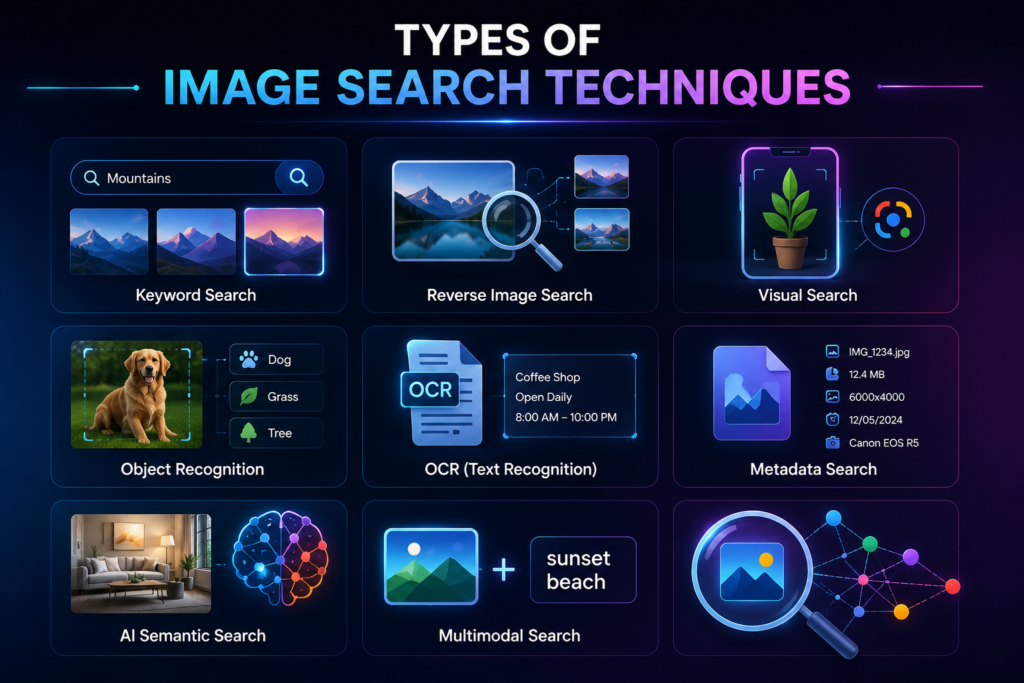
Modern image search has evolved far beyond simple keyword matching. Today, search engines use multiple techniques to understand, analyze, and retrieve images based on both textual and visual information. Each technique is designed for a specific purpose, whether you want to find similar images, identify objects, extract text, or discover visually related content. Understanding these methods helps you choose the most effective approach for different search scenarios.
Keyword Search
Keyword search is the most common image search technique, where users enter descriptive words or phrases to find relevant images. Search engines analyze the query alongside image metadata, filenames, alt text, captions, and surrounding page content to display matching results. This method is ideal for finding general images when you know exactly what you’re looking for but don’t have the image itself.
Reverse Image Search
Reverse image search allows users to upload an image instead of typing a keyword. The search engine analyzes the uploaded picture and compares it with billions of indexed images to find similar visuals, sources, duplicate copies, or related content. This technique is widely used for verifying image authenticity, tracking image usage, and identifying unknown objects, locations, or products.
Visual Search
Visual search uses artificial intelligence and computer vision to recognize the content within an image. Instead of focusing only on metadata, it understands objects, colors, shapes, and patterns before finding visually similar images or products. This technique powers modern shopping experiences, product discovery, and mobile image search applications such as Google Lens and similar AI-powered tools.
Object Recognition
Object recognition identifies individual objects that appear inside an image, such as vehicles, animals, electronics, plants, buildings, or household items. AI models detect these objects and classify them accurately, allowing users to search for detailed information or visually similar items. This technology is widely used in eCommerce, inventory management, security systems, and visual product identification.
OCR (Optical Character Recognition)
OCR is an image search technique that detects and extracts printed or handwritten text from images. Search engines use OCR to read documents, screenshots, signs, receipts, business cards, and scanned files without manual typing. This technology makes text within images searchable, editable, and translatable, improving accessibility and information retrieval.
Metadata Search
Metadata search relies on information stored alongside an image rather than the visual content itself. Search engines examine details such as filenames, alt attributes, captions, EXIF data, image dimensions, creation dates, and geolocation information to understand and categorize images. This technique is especially useful for organizing digital libraries, verifying image ownership, and improving search accuracy.
AI Semantic Search
AI semantic search focuses on understanding the meaning and context behind an image instead of relying only on keywords or visual similarities. By analyzing relationships between objects, scenes, and user intent, AI delivers more relevant search results. This advanced technique improves image discovery by matching concepts rather than exact words or identical visuals.
Multimodal Search
Multimodal search combines text and images in a single query, allowing AI to understand both visual and written information simultaneously. This technique delivers more accurate and context-aware search results, making it one of the most advanced image search methods available today.
Best Image Search Engines Compared
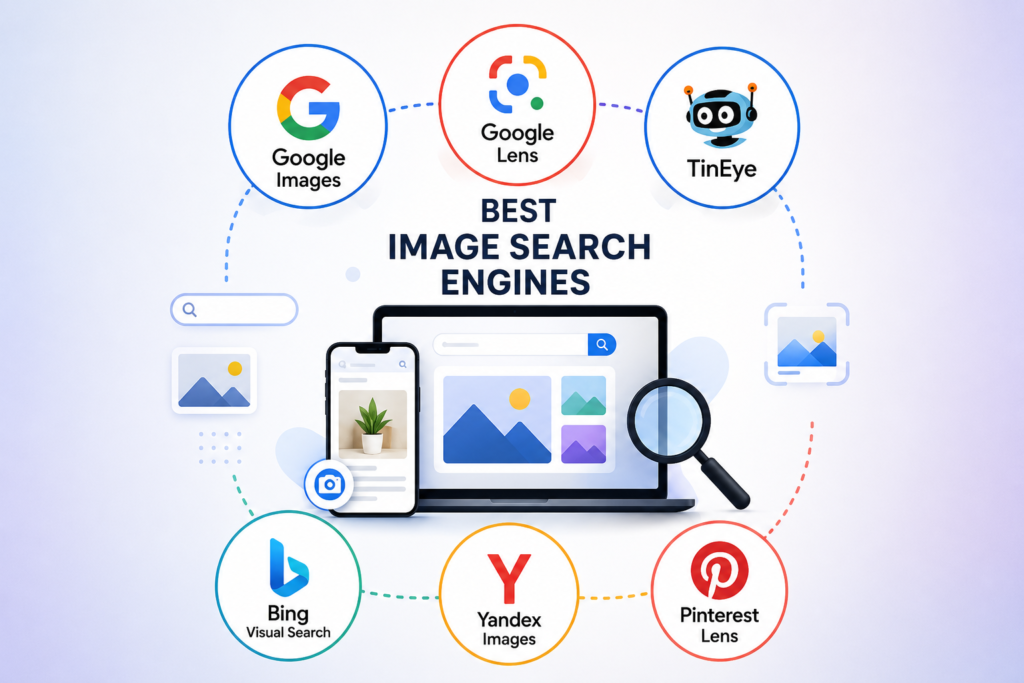
Choosing the right image search engine can significantly improve the accuracy and speed of your searches. While some platforms specialize in reverse image search, others focus on AI-powered visual recognition, object detection, or creative inspiration. Understanding each tool’s strengths helps you select the best option for your specific needs, whether you’re verifying an image, shopping online, or conducting research.
No single image search engine is perfect for every situation. For example, Google Images is excellent for general searches, TinEye excels at finding image origins, and Google Lens is designed for real-world object recognition. Comparing these tools allows you to combine their strengths and achieve more accurate, comprehensive, and reliable image search results.
| Image Search Engine | Best For | Key Features | Ideal Users |
| Google Images | General image search | Keyword search, reverse image search, search filters, related images | Everyone |
| Google Lens | Visual and object search | AI object recognition, text extraction (OCR), shopping, translation | Mobile users, shoppers, students |
| TinEye | Reverse image search | Finds original image source, duplicate detection, image tracking | Journalists, photographers, researchers |
| Bing Visual Search | Product discovery | Object recognition, shopping results, similar images | Online shoppers, marketers |
| Yandex Images | Advanced reverse search | Strong facial recognition, visually similar images, object matching | Researchers, investigators |
| Pinterest Lens | Lifestyle inspiration | Fashion, home décor, recipes, visual recommendations | Designers, creators, lifestyle enthusiasts |
Which Image Search Engine Should You Choose?
If you need an all-purpose search engine, Google Images is the best starting point because it offers excellent keyword and reverse image search capabilities. For identifying objects, translating text, or finding products using your smartphone camera, Google Lens provides a more advanced AI-powered experience. Meanwhile, TinEye remains one of the most reliable tools for tracking image origins and detecting duplicate copies across the web.
For shopping and product discovery, Bing Visual Search delivers useful visual recommendations, while Yandex Images often performs exceptionally well when searching for visually similar images or recognizing faces. If your focus is fashion, interior design, recipes, or creative inspiration, Pinterest Lens offers personalized visual discovery that helps users explore related ideas with ease.
Practical Applications of Image Search
Image search has become an essential technology across many industries, helping individuals and organizations find, verify, and analyze visual content more efficiently. Whether you’re identifying a product, checking the authenticity of a photo, or discovering similar images, modern image search techniques save time while improving accuracy. AI-powered visual search has transformed how people interact with digital content, making image-based information easier to access than ever before.
Beyond finding pictures online, image search supports business growth, academic learning, digital marketing, and professional research. Companies use it to monitor brand assets, educators rely on it to enhance learning, and journalists verify the authenticity of images before publication. As artificial intelligence continues to evolve, image search is becoming a valuable tool for solving real-world problems across multiple fields.
Common Applications of Image Search
- SEO: Discover copyright-free images, analyze competitors’ visuals, optimize image metadata, and improve image visibility in search engine results.
- eCommerce: Identify products, compare prices, locate similar items, verify product authenticity, and enhance visual shopping experiences for customers.
- Education: Find educational diagrams, historical photographs, scientific illustrations, and learning resources that support classroom teaching and academic research.
- Journalism: Verify image authenticity, detect manipulated photos, identify the original source of an image, and prevent the spread of misinformation.
- Marketing: Monitor brand assets, track image usage, discover user-generated content, analyze competitors’ campaigns, and create more engaging visual content.
- Research: Locate reliable visual references, compare historical images, analyze datasets, identify objects or landmarks, and support scientific or academic investigations.
Best Practices & Common Mistakes
Best Practices
Using the right image search strategy can significantly improve the quality and accuracy of your results. Start with high-resolution images whenever possible, as clear visuals help AI-powered search engines recognize objects, colors, and patterns more effectively. Combine descriptive keywords with reverse image search when appropriate, and explore multiple search engines to compare results. This approach increases the chances of finding relevant images, original sources, or visually similar content.
Another important practice is to take advantage of advanced search features such as image filters, OCR, and visual search tools. Always review image licensing before downloading or reusing visuals, especially for commercial projects. If you’re searching for products, landmarks, or text within an image, AI-powered tools like Google Lens can often deliver more accurate results than traditional keyword searches, saving both time and effort.
Common Mistakes
Avoid these common mistakes to get better image search results:
- Using low-quality or blurry images that make it difficult for AI to recognize visual details.
- Entering vague or incorrect keywords, which often lead to irrelevant search results.
- Ignoring search filters such as size, color, usage rights, or date, reducing search accuracy.
- Overlooking copyright and licensing restrictions before downloading or reusing images.
- Relying on only one image search engine instead of comparing results across multiple platforms for greater accuracy.
Future of Image Search
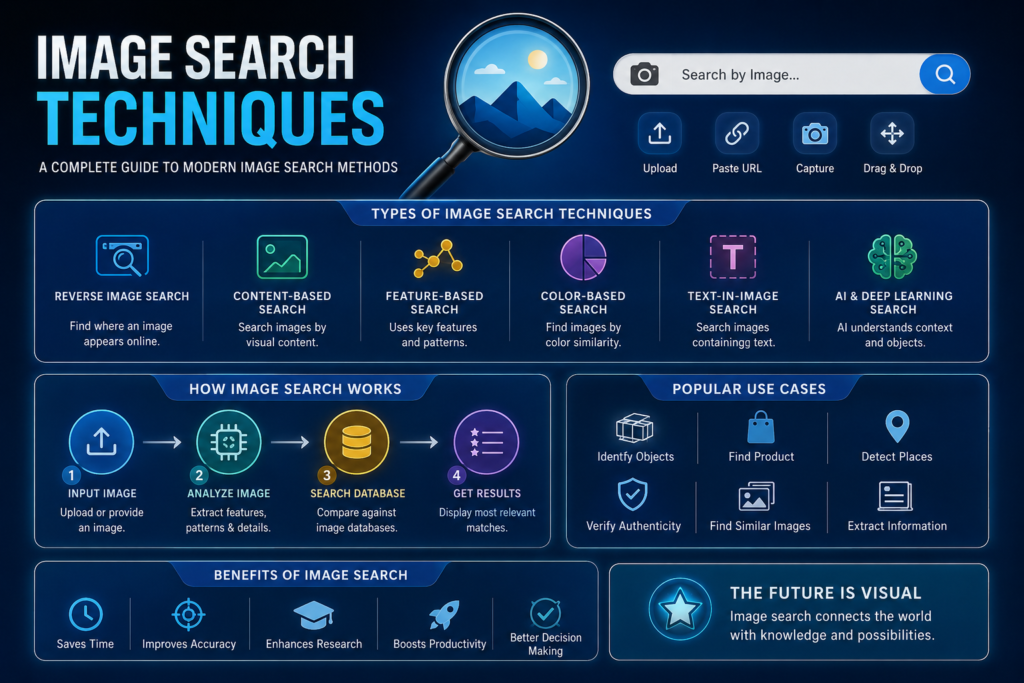
Image search is evolving rapidly as artificial intelligence continues to improve the way computers understand visual content. Future search engines will go beyond matching images by recognizing context, user intent, and relationships between objects within a scene. As AI models become more advanced, users can expect faster, more personalized, and highly accurate search experiences across websites, mobile devices, and smart technologies.
The future will also bring deeper integration between image search and everyday digital activities. From online shopping and education to healthcare and augmented reality, visual search will play an increasingly important role in helping people discover information more naturally. As machine learning algorithms continue to improve, image search will become more intelligent, making it easier to identify products, verify images, and interact with the digital world using visual input instead of text.
AI Trends
Artificial intelligence is driving the next generation of image search through technologies such as computer vision, deep learning, and generative AI. Modern AI models can recognize complex objects, understand scenes, detect manipulated images, and even interpret user intent. These advancements will improve search accuracy, automate visual analysis, and provide more relevant results across industries, including e-commerce, healthcare, education, security, and digital marketing.
Multimodal Search
Multimodal search combines text, images, and sometimes voice into a single search experience. Instead of relying on only one type of input, AI analyzes multiple forms of information simultaneously to better understand user intent. This technology is expected to become the standard for future search engines, delivering faster, smarter, and more context-aware results across desktop and mobile platforms.
Conclusion
Image search has transformed from simple keyword matching into an intelligent AI-powered technology capable of recognizing objects, understanding context, and delivering highly accurate visual results. Whether you’re searching for similar images, verifying a photo’s authenticity, identifying products, or conducting research, choosing the right image search technique can significantly improve both speed and accuracy.
By understanding how image search works, exploring the strengths of different search engines, and following best practices, you can make smarter use of modern visual search technology. As artificial intelligence continues to evolve, image search will become even more powerful, offering faster, more personalized, and highly relevant results across countless real-world applications.
FAQs
What are image search techniques?
Image search techniques are methods used to find images online through keywords, uploaded photos, or AI-powered visual recognition. These techniques help users discover similar images, identify objects, verify image sources, and retrieve relevant visual content efficiently.
How does reverse image search work?
Reverse image search analyzes an uploaded image using AI and computer vision, then compares it with billions of indexed images. It can identify similar images, locate the original source, detect duplicates, and provide additional information about the visual content.
Which image search engine is the best?
The best image search engine depends on your needs. Google Images is ideal for general searches, Google Lens excels at object recognition, TinEye specializes in reverse image search, while Yandex often performs well for visually similar image matching.
What is the difference between keyword search and visual search?
Keyword search relies on descriptive text entered by the user, while visual search analyzes the actual content of an image using artificial intelligence. Visual search can identify objects, products, and scenes without requiring detailed text descriptions.
Can I search using a screenshot?
Yes. Most modern image search tools allow you to upload screenshots. AI analyzes the screenshot’s visual elements and compares them with indexed images to find similar content, identify products, locate websites, or verify image sources.
What is OCR in image search?
OCR (Optical Character Recognition) is a technology that extracts printed or handwritten text from images. It allows users to search, copy, translate, or edit text contained within photos, scanned documents, receipts, and screenshots.
Is image search useful for SEO?
Yes. Image search helps SEO professionals find copyright-free visuals, optimize image metadata, analyze competitors’ image strategies, and improve image visibility in search engine results through proper optimization and descriptive content.
Can image search detect fake or edited images?
Image search can help identify manipulated or reused images by locating their original versions or previous appearances online. However, detecting sophisticated AI-generated or heavily edited images may require specialized forensic tools in addition to standard image search.
What is multimodal image search?
Multimodal image search combines text and visual inputs in a single query. AI processes both types of information together, producing more accurate and context-aware search results than traditional keyword-only or image-only searches.
Which image search technique should beginners use?
Beginners should start with keyword-based image search for general queries and reverse image search when they already have a picture. As they become familiar with AI-powered tools like Google Lens, they can explore visual and multimodal search for more advanced use cases.